


Description
Details
524WiFi™ P7991AV-2x2-3x3-M2AE Pro Plus — MediaTek MT7991AV Wi-Fi 7 M.2 A/E-Key AP Module, 2.4 + 5 GHz DBDC, 2x2 + 3x3
Create a BE5000-class Wi-Fi 7 access point with three spatial streams at 5 GHz and two at 2.4 GHz. The M.2 A/E-key module offers concurrent dual-band operation, five RF connections and a PCIe 3.0 interface for demanding embedded networking and AP development.
524WiFi™ Pro Plus — tuned for your wireless deployment

Our Pro Plus radio modules are tuned for their intended wireless applications. Combine the radio architecture specified for this model with the right host, software configuration and antenna system to get the most from your installation. Model-specific specifications and integration guidance help you choose the right configuration.
524WiFi™ Signal Plus™ — make the most of your RF path

Signal Plus™ brings the antenna, operating band, polarization, connectors and installation together as one RF system. Match the antenna coverage to your application and keep the feed path short and low-loss to preserve useful signal in both directions. This model is part of our tuned product range; use its specified RF connector layout and supported bands when building your Signal Plus™ installation.
A matched host, client and antenna system helps deliver the performance suited to your installation. Choose antennas and cabling for this card through 524WiFi™; select the accessories listed for your chosen configuration.
Where this module fits
High-throughput Wi-Fi 7 AP development, 3-stream 5 GHz systems, enterprise edge prototypes and custom carrier boards with extra width, power and cooling capacity.
Technical specification
| Wireless generation | Wi-Fi 7 (802.11be) |
|---|---|
| Performance class | BE5000; theoretical PHY performance class. |
| Radio layout | 2×2 at 2.4 GHz plus 3×3 at 5 GHz, DBDC |
| Supported bands | 2.4 GHz and 5 GHz concurrently |
| Channel widths | 20/40 MHz at 2.4 GHz; up to 160 MHz at 5 GHz |
| Host form factor | M.2 A/E-key, extended 40 mm width |
| Host interface | PCIe 3.0 |
| RF connectors | 5 × I-PEX / U.FL-class RF connectors |
| Silicon platform | MediaTek MT7991AV with companion RF front end |
| Linux driver family | Linux mt76 / mt7996-family support; current matching firmware required |
| Power design | 3.3 V ±5%; published technical load 11.5 W (about 3.49 A at 3.3 V before design margin). Verify carrier current and thermal capacity for the exact revision. |
| Mechanical envelope | 40 × 52 × 5.1 mm class; verify keep-out area and mounting screw position against the host drawing. |
| Environmental range | Operating −10 to +70 °C in a dry, condensation-free environment. |
P7991AV-2x2-3x3-M2AE engineering notes: radio, host and real deployment
Radio architecture and application
Create a BE5000-class Wi-Fi 7 access point with three spatial streams at 5 GHz and two at 2.4 GHz. The M.2 A/E-key module offers concurrent dual-band operation, five RF connections and a PCIe 3.0 interface for demanding embedded networking and AP development.
P7991AV-2x2-3x3-M2AE — PHY rate by radio configuration
2.4 GHz / 40 MHz / 2 streams: 688 Mbit/s
5 GHz / 160 MHz / 3 streams: 4323 Mbit/s
Deployment design for M.2 A/E-key
Use this model on a carrier with a verified high-current 3.3 V rail and adequate heatsink space. The technical specification lists 11.5 W, corresponding to approximately 3.49 A at 3.3 V before design margin. Size the carrier supply for that load and its transient current requirements.
OpenWrt driver and firmware selection
Package/stack reference: A hardware-revision-matched MT7991 driver/firmware image; confirm the PCI ID and supported mt76 build before installation. Software packages are selected for the installed OpenWrt release and target platform. Matching release-specific packages align the driver with the running kernel ABI. Use kernel modules built for the installed system image. The complete software configuration combines the driver, firmware, calibration data and selected radio profile.
Check PCI enumeration first, then firmware loading, then the PHY capabilities and finally hostapd configuration. On minimal images, lspci and iw may need their respective utilities installed. Keep the working image and configuration before changing the software stack. Preserve the radio’s original device-specific EEPROM and calibration data.
lspci -nnk
uname -r
dmesg | grep -Ei "mt76|mt79|mt7615|firmware|pci"
iw phy
iw reg get
iw dev
logread | grep -Ei "hostapd|wlan|firmware"
In iw phy , confirm AP interface support, band frequencies, channel widths and valid interface combinations. Use iw dev to identify the interface names assigned by the installed image. Use iw dev INTERFACE station dump with the real AP interface to inspect per-client rates, signal and retries. A missing PHY after successful PCI enumeration points toward driver/firmware initialization rather than the antenna cable.
RF budget and fault isolation
Antenna gain, cable attenuation and legal conducted power form one link budget. In simplified dB terms, EIRP equals radio output plus antenna gain minus feed loss; a higher-gain antenna may require lower radio output under the applicable limit. A balanced two-way link combines suitable antennas with the transmit capability at both ends. Per-chain RSSI and retry statistics help tune antenna placement and permitted transmit power.
For instability under traffic, capture logs before rebooting and compare a cold open-bench test with the closed enclosure. Check supply droop, thermals, firmware resets and the wired uplink. If only wider channels fail, investigate interference, channel availability and client capability before replacing the hardware. For remote sites, retain a wired management or recovery path while qualifying wireless changes.
Configuration documentation and support
Use the OpenWrt wireless configuration guide for general configuration. Revision-specific files and assistance remain through 524WiFi™ Downloads & Support . Send the model code, PCB revision, host, country, exact image/kernel version and sanitized diagnostic logs.
Linux, OpenWrt, firmware and board data
The module uses the Linux mt76 / mt7996-family support; current matching firmware required stack. Successful enumeration requires a real PCIe 3.0 connection, sufficient 3.3 V power, a kernel/mt76 combination supporting the silicon generation, matching firmware and—where the platform requires it—the correct board-data/calibration file. Select firmware and BDF files for the exact hardware revision.
- Confirm the PCIe device appears with
lspci -nnbefore debugging the wireless stack. - Review
dmesg | grep -Ei 'mt76|mt79|firmware|pci'for firmware, reset, IOMMU and memory-allocation messages. - Verify loaded modules with
lsmod | grep -E 'mt76|mt79'. - Use
iw phyandiw reg getto confirm supported bands, channel widths and the active regulatory domain.
Use our 524WiFi™ Downloads & Support area for model-specific software guidance. Contact support with the 524WiFi™ model code, PCB revision, host board, kernel/OpenWrt release and a complete boot log when a revision-specific package is required.
Installation checklist
- With the host powered off and ESD precautions in place, install the card in a slot wired for PCIe 3.0.
- Check the 3.3 V rail against the stated power budget and provide airflow or a correctly fitted heatsink for sustained AP traffic.
- Seat the card squarely, install the mounting screw and keep metalwork away from components and antenna connectors.
- Attach all required RF paths using the exact connector type: 5 × I-PEX / U.FL-class RF connectors. Connect and disconnect micro-coax vertically with the proper tool.
- Boot with a supported kernel/firmware set, check PCIe enumeration, then configure country, channel, bandwidth and transmit power legally.
- Run load and temperature tests before closing the enclosure or deploying remotely.
Signal Plus™: antenna and RF-path integration
Signal Plus™ is the 524WiFi™ selection path for matching the correct number of pigtails, low-loss feed length and antennas to the radio layout. Match the complete RF system to the installation and operating country. For this model start from 5 × I-PEX / U.FL-class RF connectors and 2.4 GHz and 5 GHz concurrently. Keep coax runs short, maintain connector separation and use antennas approved for the intended bands and country.
Browse internal RF pigtails and MIMO antennas, then ask us to verify the connector and band combination before ordering a complete RF set.
Configuration guidance
| PCIe device detection | Check that the socket carries PCIe, inspect reset timing, seating, power rail and BIOS/device-tree configuration. |
|---|---|
| Firmware setup | Match the firmware and board-data files to this card’s driver and hardware revision. |
| Radio and band configuration | Check the selected radio mode, firmware, country code, antenna mapping and whether the model is DBDC or selectable-band. |
| Stable operation under traffic | Measure 3.3 V droop and temperature, add cooling, shorten RF feeds and review PCIe/IOMMU errors. |
| Throughput configuration | Verify negotiated channel width, client stream count, interference, antenna polarization, regulatory power and CPU/network bottlenecks. |
FAQ
What platforms is this card designed for?
Embedded access points, Linux gateways and specialist networking hosts with the specified PCIe interface, power supply and RF connections.
What does Pro Plus bring to this product?
A tuned professional radio platform with model-specific integration guidance, RF-system selection and access to our technical support.
Does Signal Plus™ include antennas?
Choose the antenna and pigtail set listed for your ordered RF kit. Use our antenna and pigtail links to build a verified set.
Can 524WiFi™ supply firmware?
Model-specific firmware guidance is available through our technical support. Linux/OpenWrt packages provide the software path, complemented by the appropriate board data for the host and hardware revision.
What information should I send for compatibility review?
Send the exact 524WiFi™ model code, host board, slot wiring or schematic, available 3.3 V current, kernel/OpenWrt version, intended bands/country, enclosure and antenna plan.
Technical model and configuration
P7991AV-2x2-3x3-M2AE : MediaTek MT7991AV; MediaTek MT7991AV Wi-Fi 7 M.2 A/E-Key AP Module, 2.4 + 5 GHz DBDC, 2x2 + 3x3. The model identifies the platform, radio configuration, supported bands and the relevant form factor or wired interface.
Additional
Additional Information
| Brand | 524WIFI |
|---|---|
| firmware | http://wifi5.eu/dls/524wifi |
Tags
Reviews
Having a questiion ?? Contact us - info at 524wifi.com !!
-
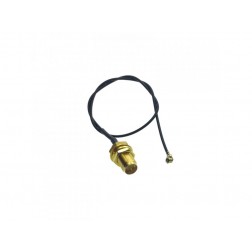 524WiFi WiFi 6 pigtail cable RF UltraMini U.FL plug to rSMA bulkhead 20cm, black cable
$3.49
524WiFi WiFi 6 pigtail cable RF UltraMini U.FL plug to rSMA bulkhead 20cm, black cable
$3.49 -
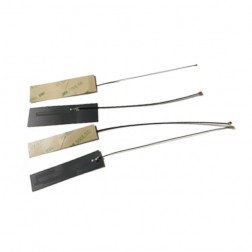 524 WiFi internal FPC Dual Band 5dBi Antenna , 2.4 / 5 GHz , with cable, ufl IPEX 1 connector
$5.50
524 WiFi internal FPC Dual Band 5dBi Antenna , 2.4 / 5 GHz , with cable, ufl IPEX 1 connector
$5.50 -
 524 WiFi ROD omni dual band antenna, 5dBi, RSMA male, 2.4 + 5 GHz (dual band), tuned
$6.99
524 WiFi ROD omni dual band antenna, 5dBi, RSMA male, 2.4 + 5 GHz (dual band), tuned
$6.99 -
 524WiFi Linux PC PCIe adapter card for M.2 A-E key WiFi 6/7 Mediatek modules, ACPX1-201, high performance
$29.00
524WiFi Linux PC PCIe adapter card for M.2 A-E key WiFi 6/7 Mediatek modules, ACPX1-201, high performance
$29.00