

Choosing a Wi-Fi 7 board by speed alone is how you end up redesigning your PCB.
Both boards below are Qualcomm-based. Both are tri-band Wi-Fi 7.
They are built for very different products.
The real questions are:
- How many antennas does 2.4GHz need?
- Which wired ports does your design use?
- How does the device get power?
- What modules must fit inside?
Wireless speed answers none of these.
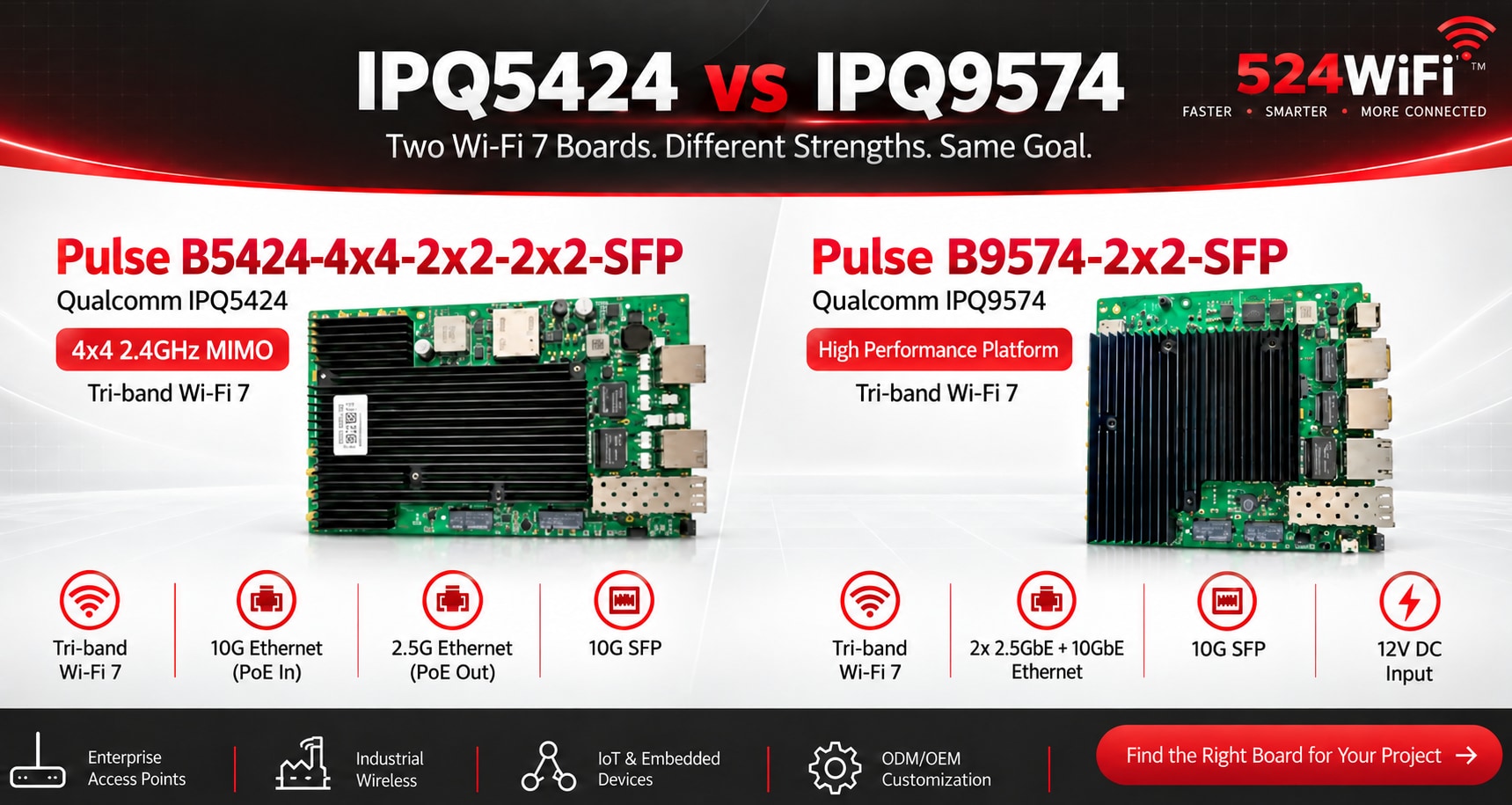
524WiFi™ Pulse B5424-4x4-2x2-2x2-SFP Qualcomm IPQ5424
Built for designs that need:
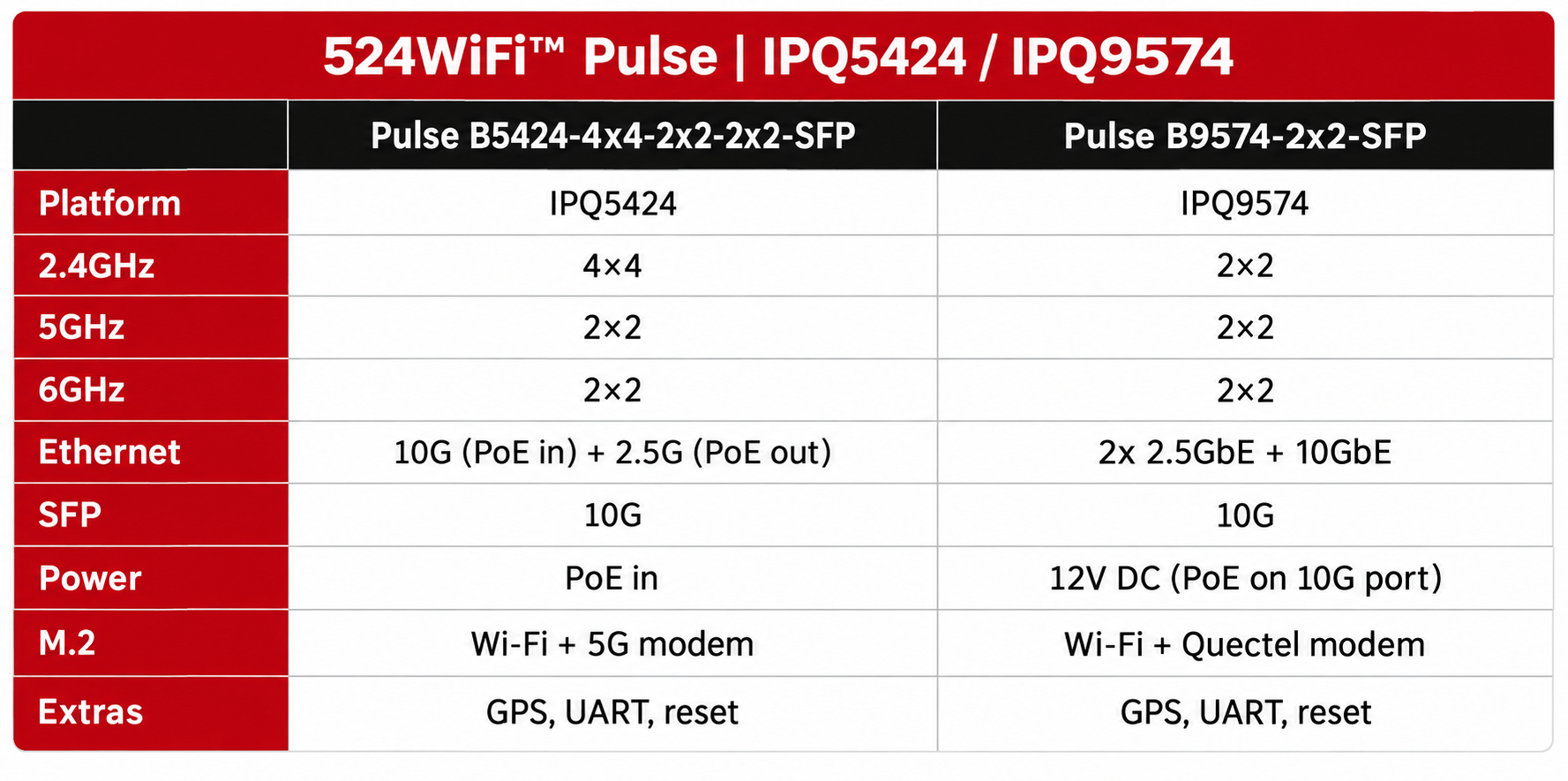
- 4×4 MIMO on 2.4GHz (2×2 on 5GHz and 6GHz)
- 10G Ethernet with PoE in
- 2.5G Ethernet with PoE out
- 10G SFP
- M.2 for Wi-Fi + M.2 for a 5G modem
The PoE-out port can power a downstream device, such as a camera.
524WiFi™ Pulse B9574-2x2-SFP Qualcomm IPQ9574
Built for designs that need:
- 2×2 MIMO on all three bands
- Two 2.5GbE ports + one 10GbE port
- 10G SFP
- 12V DC input
- M.2 for Wi-Fi + M.2 for a Quectel modem
The 10G port is marked for PoE. Confirm the power setup for your hardware version.
Side by side
Pick 524WiFi™ Pulse B5424-4x4-2x2-2x2-SFP if you need:
- A 4×4 radio on 2.4GHz
- PoE in and PoE out on one board
- 2.5G Ethernet next to 10G SFP
- A 5G modem slot
Pick 524WiFi™ Pulse B9574-2x2-SFP if you need:
- The IPQ9574 platform
- Separate 2.5GbE ports plus 10GbE
- A dedicated 12V DC input
- A Quectel modem slot
The final choice depends on:
- Target throughput
- Software functions
- Power budget
- System design
We do hardware and software customization on both platforms.
Tell us your application, interfaces and power budget. We will help you shortlist.
Explore our platform
- 524WiFi™ Pulse B5424-4x4 Pro Plus — Qualcomm IPQ5424 Marina Wi-Fi 7 Tri-Band Router Board with Dual 10GbE and Quad 2.5GbE
- 524WiFi™ Pulse B9574-2x2-SFP Pro Plus — Qualcomm IPQ9574 Alder Wi-Fi 7 Tri-Band 2x2 Router Board with 10GbE, Dual 2.5GbE and 10G SFP
- 524WiFi™ Pulse B9574-4M2 Pro Plus — Qualcomm IPQ9574 Alder Wi-Fi 7 Development Router Board with Four M.2 E-Key Slots and Dual 10GbE
- Pulse B5424-4x4-2x2-2x2-SFP: discuss the exact fiber, PoE and radio configuration with our team.